![login-logo.png]](https://helpcenter.casafari.com/hs-fs/hubfs/login-logo.png?height=23&name=login-logo.png)
The checklist is a tool that helps you create and organise tasks that must be completed in a certain state of the business.
Settings
1. Go to Leads/Businesses - Sales and/or Listing - Setup States.
2. Select the lead state to add the checklist too.
3. Click Add new checklist.
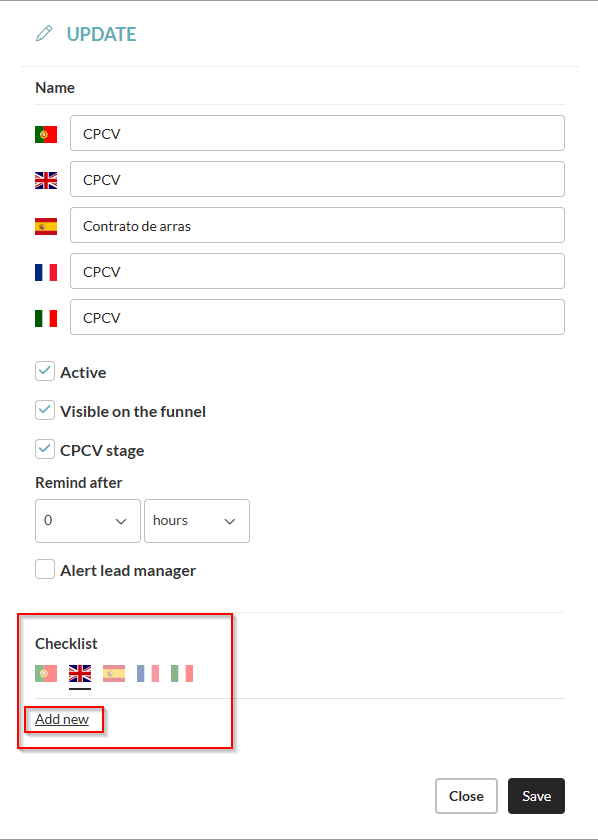
4. Configure the tasks and translate them into the different languages:
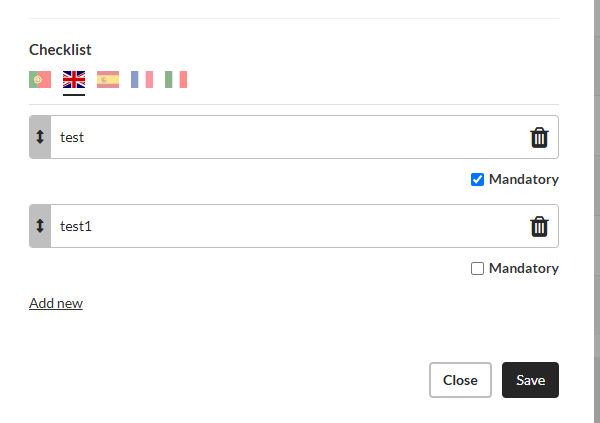
5. Click Save.
How to use
1. Go to Leads/Deals - Sales or New Listings and List.
2. Select the lead and access the details.
3. Change the lead status and see the checklist on the right side panels.
4. Mark the tasks as completed.

5. Click Save.
This feature is available for all CASAFARI CRM users.
For more information, please contact us by email: help@casafaricrm.com