![login-logo.png]](https://helpcenter.casafari.com/hs-fs/hubfs/login-logo.png?height=23&name=login-logo.png)
pisos.com is a portal where you can publish all the ads of your properties located in Spain. With more than 500,000 properties, pisos.com has the best offers available for those who want to buy or rent a house or flat.
Step by step:
-
Create an account on the pisos.com portal. If you do not have one, you should contact the portal directly by email: negocio@pisos.com and request the registration of your account.
-
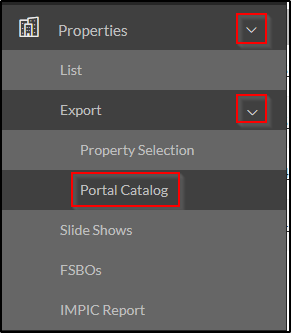
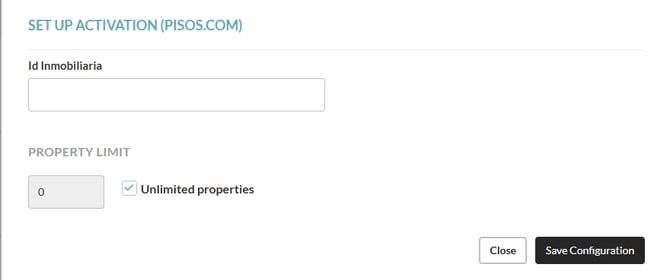
Go to Properties - Export - Portal Catalog - Configuration and insert the activation data you received from the portal. Set the limit of properties to be exported, if necessary.

-
Go to Properties - Export - Property Selection and select the properties that should be uploaded to pisos.com.
Observations from pisos.com:
- Each time a property level change is made within the CRM, we send that change. However, the portal may take longer to process it.
Frequently Asked Questions:
"I am exporting properties from a different system. What do I need to do to switch to CASAFARI CRM"?
Contact your pisos.com account manager and ask him to change your import system to CASAFARI CRM.
Related articles:
How to export my properties to real estate portals?
How to see if my properties have been exported to the portals?
How do I activate a property portal?
How do I consult the business model and contacts of each portal?
For more information, contact us by email: help@casafaricrm.com