![login-logo.png]](https://helpcenter.casafari.com/hs-fs/hubfs/login-logo.png?height=23&name=login-logo.png)
Get maximum international exposure for your luxury property ads! Publish your property ads on the world's largest luxury property portal.
Step by step:
-
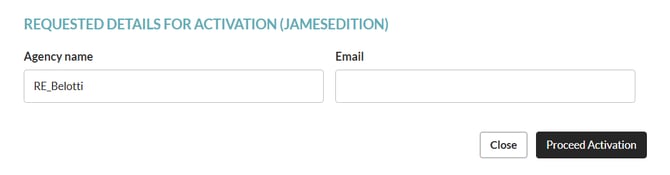
Create an account in the James Edition portal. If not, you can request registration through the CRM: go to Properties - Export - Portal Catalogue - James Edition, click "apply for registration" and fill in the fields..


-
If you already have an account created in the James Edition portal, you must also request registration within the CRM, using the same email address that was previously used to create the account in the portal.
-
If necessary, go to Properties - Export - Portal Catalogue and set the limit of properties to be exported in the Settings option.
-
Go to Properties - Export - Property Selection and select the properties that should be sent to James Edition.

James Edition Observations:
The portal will not publish properties that have any of the following conditions:
-
The description has some external link (URL) included.
-
The price of the property is less than 500.000 euros.
-
Properties that have the word "off-plan" in the description. This portal does not accept properties that are still in the planning stage.
-
Shop/Commercial properties.
-
Properties that have less than 2 photographs.
-
James Edition detects property amenities based on keywords written in the property description.
- The CRM property feed is updated once a day (usually during the early morning hours). However, the portal may take longer to process it.
Frequently Asked Questions:
"I am exporting properties from a different system. What do I need to do to switch to CASAFARI CRM"?
Contact your James Edition account manager and ask him to change your import system to CASAFARI CRM.
This feature is available on the PLUS and PREMIUM plans.
For more information, please contact us by email: help@casafaricrm.com