![login-logo.png]](https://helpcenter.casafari.com/hs-fs/hubfs/login-logo.png?height=23&name=login-logo.png)
Fotocasa/Habitaclia is the leading real estate portal in Spain and has more than 1 million properties. It also has a presence in more than 16 countries in Europe and Latin America. Display your properties on Fotocasa/Habitaclia and increase the chances of closing more deals!
Step by step:
-
Create an account on the portal Fotocasa/Habitaclia. If you do not have one, you must contact the portal directly via email: cliente@fotocasa.pro and request the following data: API Key, AgentID, and AgencyID.
-
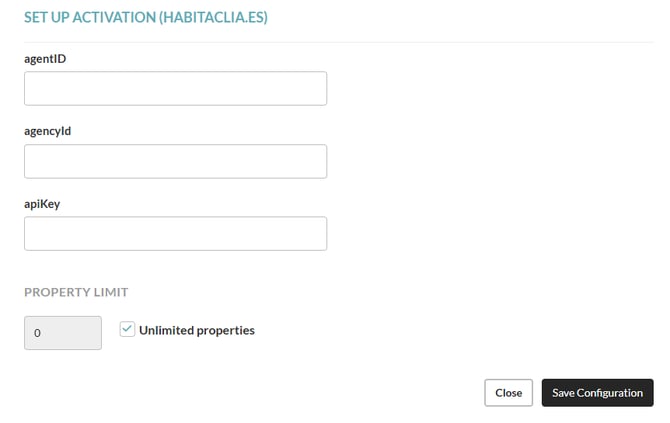
Go to Properties - Export - Portals Catalogue - Configuration and enter the activation data you received from the portal. Set the limit of properties to be exported if required.



-
Go to Properties - Export - Property Selection and select the properties that should be sent to Fotocasa/Habitaclia.
Fotocasa/Habitaclia's observations:
-
If the property does not have an Energy Certificate configured in the CRM, the portal will automatically set the following values:

-
The property must have the “Zone” defined in the CRM to be correctly exported to this portal.
-
The geolocation must be set on the properties to have them published.
-
Once the ad is published in Fotocasa/Habitaclia, you cannot change the type of property. If you need to do so you must clone the property in the CRM, setting it up with the new type of property, before activating it. Remove the original listing from the portal and export the new one.
- Each time a property level change is made within the CRM, we send that change. However, the portal may take longer to process it.
Consultation of the exportation history
If your properties have been successfully updated from the CRM to the portal, you may see the following messages in the history:


- The property has been successfully updated, but remember that the corresponding energy certificate still needs to be reported. - The property has been updated without the energy certificate. You should enter this information in the CRM, in the detail of the property.
- The property has been successfully updated - It means that any property that has been changed in the CRM has been updated in Fotocasa/Habitaclia.
- Property inserted in Fotocasa/Habitaclia - The new property that you inserted in the CRM has been successfully sent to the portal.
- The property has been successfully updated, but remember that it is compulsory to inform the energy certificate. For properties located in Catalonia, if it is not indicated, we will show the least efficient energy rating ("G"-999), both in emissions and consumption. - The property has been updated without the energy certificate. You should enter this information in the CRM, in the detail of the property, so that it can appear correctly in the portal.
If, on the other hand, you receive any of the following messages, it means that the actions you have carried out in CRM have not been published in Fotocasa/Habitaclia. See below:
- BadRequest Error - You should wait at least 5 minutes before operating on this property again - - Error 504 - Gateway Time-out - Gateway Timeout - There was a technical error in the integration with the portal. You should wait at least 5 minutes before you can update the property.
- Error 504 - Gateway Time-out - There was a technical error in the integration with the gateway. Wait a few minutes and try again to update the property.
- BadRequest Error - Error verifying the existence of the postcode - The property was not exported due to the inexistence of the postcode. You must enter this information in the property's location in the CRM.
- BadRequest Error - Cannot change the type of building of a property with an active external ID - Once the ad is published in Fotocasa/Habitaclia, you cannot change the type of property. If you need to do so, you must clone the property in the CRM, configuring it with the new property type, before activating it. Then delete the original property and export the new property.
- BadRequest Error - The postcode does not exist - The postcode inserted in the CRM does not exist. You will need to change it to a valid one for it to be reported to the portal.
- BadRequest Error - The postcode length is incorrect - The postcode entered in the CRM is not correctly entered. You will need to change it to a valid one so that it will be reported to the portal.


Search in the FAQ on how to access the exportation history.
Frequently Asked Questions:
"I am exporting properties from a different system. What do I need to do to switch to CASAFARI CRM"?
Contact your Fotocasa/Habitaclia account manager and ask him to change your import system to CASAFARI CRM.
Related articles:
How to export my properties to real estate portals?
How to see if my properties have been exported to the portals?
How do I activate a property portal?
How do I consult the business model and contacts of each portal?
For more information, please contact us by email: help@casafaricrm.com