---
title: 📝 Comment modifier le contenu et l'ordre du rapport
description: Si vous souhaitez personnaliser et modifier votre rapport d’estimation avant de le partager, suivez les étapes ci-dessous :
---
[Passer au contenu](https://helpcenter.casafari.com/fr/knowledge-base/comment-modifier-le-contenu-et-lordre-du-rapport#main-content)
Français
Afficher le sous-menu pour les traductions
[](https://helpcenter.casafari.com/fr/knowledge-base?hsLang=fr)
- Centre d'Aide
Afficher le sous-menu pour Centre d'Aide
- [Inscrivez-vous à nous webinaires](https://app.livestorm.co/casafari)
- [Tutoriels sur YouTube](https://www.youtube.com/watch?v=0A8AtaFLX7k&list=PLfDxTRJ55GS0mDXCuilzbAnkEoRVocJfM)
- [Login CASAFARI](https://fr.casafari.com/login)
Ouvrir la navigation principale
Fermer la navigation principale
- Centre d'Aide
Afficher le sous-menu pour Centre d'Aide
- [Inscrivez-vous à nous webinaires](https://app.livestorm.co/casafari)
- [Tutoriels sur YouTube](https://www.youtube.com/watch?v=0A8AtaFLX7k&list=PLfDxTRJ55GS0mDXCuilzbAnkEoRVocJfM)
- [Login CASAFARI](https://fr.casafari.com/login)
- Français
Afficher le sous-menu pour les traductions
Comment pouvons-nous vous aider ?
- Il n'y a aucune suggestion car le champ de recherche est vide.
1. [Knowledge Base - CASAFARI](https://helpcenter.casafari.com/fr/knowledge-base?hsLang=fr)
2. [Outils CASAFARI](https://helpcenter.casafari.com/fr/knowledge-base/outils-casafari?hsLang=fr)
3. [Évaluations & Étude de Marché (ACM)](https://helpcenter.casafari.com/fr/knowledge-base/outils-casafari?hsLang=fr#%C3%A9valuations-%C3%A9tude-de-march%C3%A9-acm)
# 📝 Comment modifier le contenu et l'ordre du rapport
## Si vous souhaitez personnaliser et modifier votre rapport d’estimation avant de le partager, suivez les étapes ci-dessous :
**Étape 1 : Accéder à l’outil d’estimation immobilière**
- Connectez-vous à votre compte CASAFARI.
- Accédez à l’outil d’estimation immobilière.
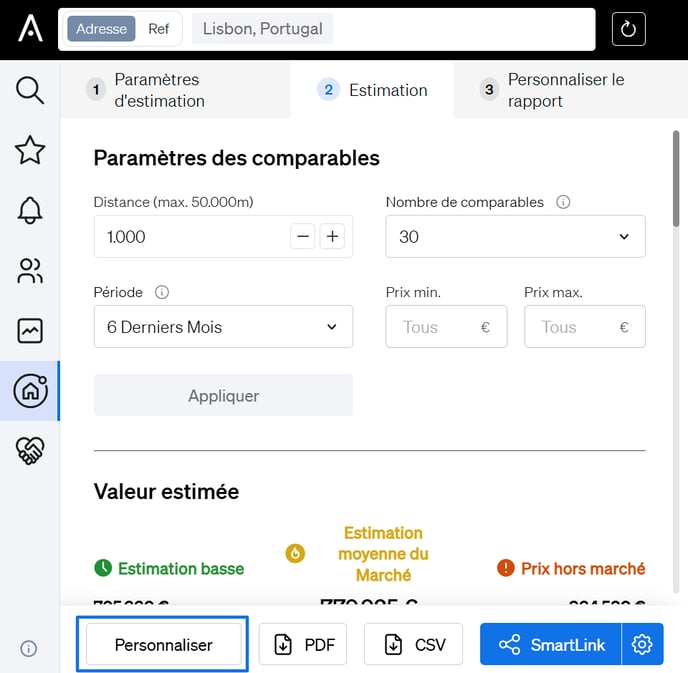
- Dans la deuxième étape du processus d’évaluation, ne générez pas encore de rapport ou de SmartLink.
- Faites plutôt défiler vers le bas et sélectionnez « Personnaliser le rapport ».
---
**🎨 Étape 2 : Personnaliser le rapport**
Sur la page Personnaliser le rapport, vous pouvez personnaliser :
- **Détails du rapport**
- **Valeur estimée**
- **Photo de la propriété**
- **Ordre du contenu**
- **Fichiers personnalisés téléchargés**
- **Schéma de couleurs du rapport**
---
**🧩 Personnaliser le contenu et la commande**
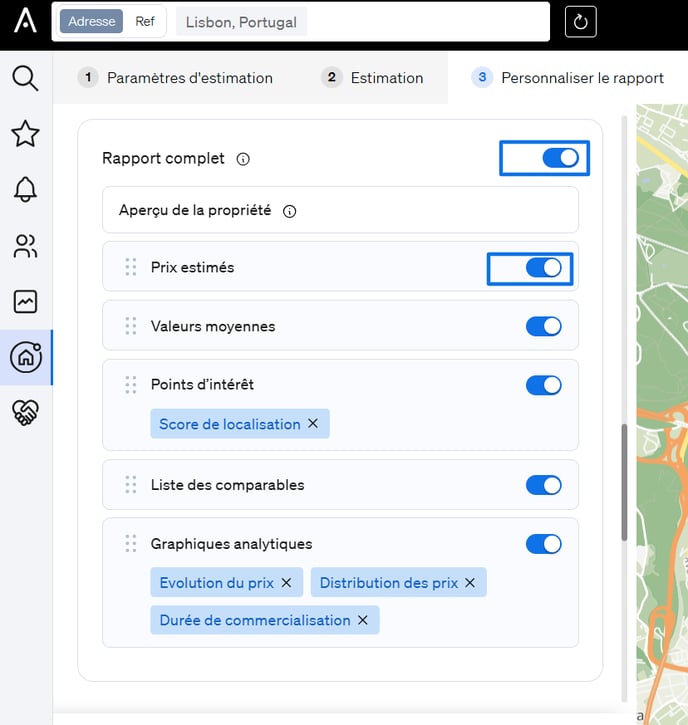
**Pour modifier le contenu du rapport :**
- Chaque section a une bulle sur la gauche.
- **Cliquez sur la bulle** pour l'inclure ou l'exclure :
- **Bleu = inclus**
- **Gris = exclu**
- - ****
---
**🔀 Pour modifier l’ordre des sections :**
- Cliquez et maintenez l’icône à six points sur le côté gauche d’une section.
**Glisser-déposer** la section pour la réorganiser dans votre ordre préféré.
- [Compte et configuration](https://helpcenter.casafari.com/fr/knowledge-base/compte-et-configuration?hsLang=fr#main-content)
- [gestion du compte](https://helpcenter.casafari.com/fr/knowledge-base/compte-et-configuration?hsLang=fr#gestion-du-compte)
- [securite](https://helpcenter.casafari.com/fr/knowledge-base/compte-et-configuration?hsLang=fr#securite)
- [facturation](https://helpcenter.casafari.com/fr/knowledge-base/compte-et-configuration?hsLang=fr#facturation)
- [aide et resources](https://helpcenter.casafari.com/fr/knowledge-base/compte-et-configuration?hsLang=fr#aide-et-resources)
- [Outils CASAFARI](https://helpcenter.casafari.com/fr/knowledge-base/outils-casafari?hsLang=fr#main-content)
- [recherche de propriétés](https://helpcenter.casafari.com/fr/knowledge-base/outils-casafari?hsLang=fr#recherche-de-propri%C3%A9t%C3%A9s)
- [page de propriété](https://helpcenter.casafari.com/fr/knowledge-base/outils-casafari?hsLang=fr#page-de-propri%C3%A9t%C3%A9)
- [alertes](https://helpcenter.casafari.com/fr/knowledge-base/outils-casafari?hsLang=fr#alertes)
- [Favoris](https://helpcenter.casafari.com/fr/knowledge-base/outils-casafari?hsLang=fr#favoris)
- [Évaluations & Étude de Marché (ACM)](https://helpcenter.casafari.com/fr/knowledge-base/outils-casafari?hsLang=fr#%C3%A9valuations-%C3%A9tude-de-march%C3%A9-acm)
- [analyse de marché](https://helpcenter.casafari.com/fr/knowledge-base/outils-casafari?hsLang=fr#analyse-de-march%C3%A9)
- [CASAFARI Connect](https://helpcenter.casafari.com/fr/knowledge-base/outils-casafari?hsLang=fr#casafari-connect)
- [LeadFlow](https://helpcenter.casafari.com/fr/knowledge-base/outils-casafari?hsLang=fr#leadflow)
- [Lead Magnet](https://helpcenter.casafari.com/fr/knowledge-base/outils-casafari?hsLang=fr#lead-magnet)
- [Chrome Extension](https://helpcenter.casafari.com/fr/knowledge-base/outils-casafari?hsLang=fr#chrome-extension)
- [Smartlinks](https://helpcenter.casafari.com/fr/knowledge-base/outils-casafari?hsLang=fr#smartlinks)
- [Signalement d’erreurs](https://helpcenter.casafari.com/fr/knowledge-base/signalement-derreurs?hsLang=fr#main-content)
- [Mise à jour](https://helpcenter.casafari.com/fr/knowledge-base/signalement-derreurs?hsLang=fr#mise-%C3%A0-jour)
- [retours et signalements](https://helpcenter.casafari.com/fr/knowledge-base/signalement-derreurs?hsLang=fr#retours-et-signalements)
[](https://www.casafari.com/wp-content/uploads/2026/05/LOGO_CASAFARI-AI_Colored.png?hsLang=fr)
# **Chaque Propriété, Chaque Détail.**
###### Contactez notre [équipe d'assistance](mailto:support@casafari.com). Contactez notre [équipe commerciale](mailto:commercial@casafari.com). Contactez notre [équipe de facturation](mailto:billing@casafari.com).
© 2025 Casafari Europe Ltd