
🔐 Access CASAFARI Platform
- Log into your CASAFARI account using your credentials.
🏠 Open the Property Valuation Tool
- From your dashboard, select the Property Valuation tool.
🔍 Navigate to “My Valuations”
- On the Property Valuation search page, scroll to the bottom.
- You’ll see two options: “My Valuations” and “Search.
- Click on “My Valuations.
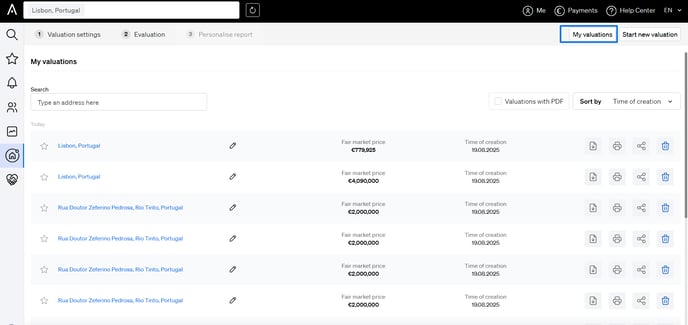
📄 View and Manage Your Past Valuations
On the My Valuations page, you can:
- View all your past valuations
- Run the valuation again
- Edit existing valuations
- Share a valuation
- Export as PDF
- Delete valuations you no longer need
💾 How Many Valuations Can I Save?
When reviewing your past valuations, you may notice that not all of them are visible.
📦 Storage Limit
- Your account stores only the last 100 valuations.
- Once you reach this limit, older valuations will be automatically removed from the list to make space for new ones.
To keep a permanent record of important valuations, consider:
- Exporting them as PDF
- Saving them locally or in your preferred storage system