
🔐 Step 1: Log in to Your CASAFARI Account
- Go to www.casafari.com.
- Click Log in and enter your credentials.
📍 Step 2: Access the CMA Tool
- From the main menu, open the Property Valuation (CMA) tool.
- Enter the property address, postcode, or cadastral reference to start your valuation.
📊 Step 3: Review Comparables
- Navigate to the "Evaluation" tab.
- Here, you will see a list of comparables used in the analysis.
💶 Step 4: Identify Real Closing Prices
- Comparables with real closing prices are marked with the purple tag “closing price”.
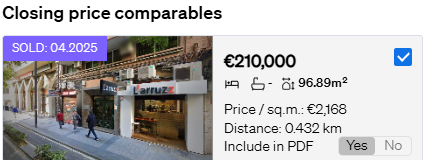
- These values come from official records or trusted transaction data in your market.
💡 Tip:
Use comparables with real closing prices to enhance your valuation credibility, especially in negotiations or client reports.
📄 Step 5: Generate Your Report
After reviewing or adjusting your comparables, click Customise, then export your report as a PDF or share it via SmartLink.
📩 Need Help?
For more information about comparables or closing price data, reach out to our support team at: support@casafari.com