
This tool makes client collaboration easier and more efficient.
🧠 What Are SmartLinks?
SmartLinks are dynamic links generated from a curated selection of properties. When shared with clients, they present listings in a visually appealing format, without overwhelming branding or platform distractions. These links are live and automatically updated with the latest data.
📍 Where to Find SmartLinks in the Property Page
To create and access SmartLinks from a specific property:
- Log in to your CASAFARI account.
- Navigate to the Property Search tool and click on a property to open its Property Page.
- On the top right corner of the page, locate the button "Export & Share".
🔧 How to Use SmartLinks on the Property Page
➤ Step-by-Step Instructions:
- To choose the title of your Smartlink, click on the pencil icon beside the title of the page. Type the new title you choose and then on “save”.
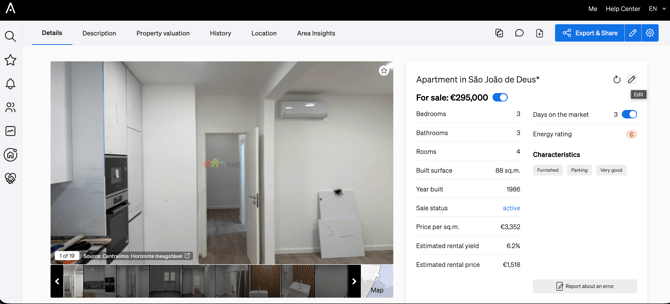
- To decide which content to include in your SmartLink, you can either:
a. Click on the pencil icon beside the “Export & Share” button. On the popup that comes up, scroll down to turn content blocks on and off. Then, click on “Create SmartLink”.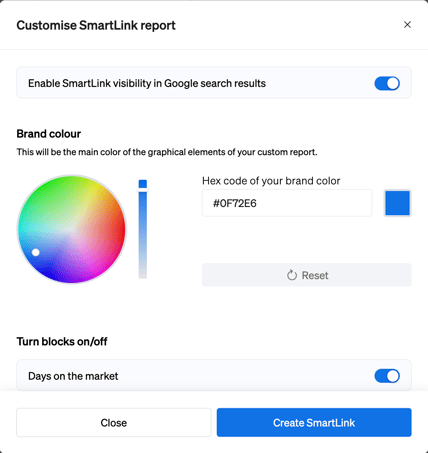
b. The other possibility is scrolling through the property page to turn on and off the toggles of each content block. That way you pre-define what will be included in your SmartLink. When you’re done choosing, click on the “Export & Share” button at the top of the page to create your SmartLink.
🎯 When Should You Use SmartLinks?
- When sharing hand-picked listings with a buyer.
- To follow up after a meeting or client call.
- To send personalized suggestions during property searches.
- When collaborating with colleagues on a set of properties.
✅ Benefits of SmartLinks on the Property Page
|
Benefit |
Description |
|
🖥️ Professional Layout |
Present properties in a clean, client-friendly format. |
|
🔄 Live Synchronization |
SmartLinks always show the latest property data. |
|
📊 Engagement Tracking |
Know if and when clients viewed your suggestions. |
|
💬 Two-Way Communication |
Collect feedback directly through comments on shared properties. |
🎥 Video Walkthrough
To see this feature in action, check out CASAFARI’s video tutorial:
https://youtu.be/x7m7UFM_3z8?si=3PD2QrjJ0j5OZQ
SmartLinks help streamline communication and make it easier to keep your clients informed and engaged. Start using them directly from the Property Page to save time and boost your productivity with CASAFARI.