
Whether you're looking for a specific listing or exploring an area, our flexible search options help you find exactly what you need.
✅ What Can You Search For?
With CASAFARI, you can search using the following criteria:
|
Search Method |
Description |
|
Location |
Search by city, region, or country |
|
Street Name |
Type in the name of a specific street to see listings located there |
|
ZIP Code |
Enter postal codes to narrow down your search by area |
|
Reference ID / URL |
Use websites listing IDs/Refs or paste an external URL to find a specific listing |
|
Phone Number |
Input a contact number to search for listings associated with it |
|
Draw on Map |
Use the polygon drawing tool to define custom geographic search areas |
📍 How to Use the Search Bar
- Login to your CASAFARI account.
- Open the Property Sourcing Tool
- Locate the search bar at the top of the page.

4. Click the Search icon and start typing the address. Then select the desired location from the search suggestions list.
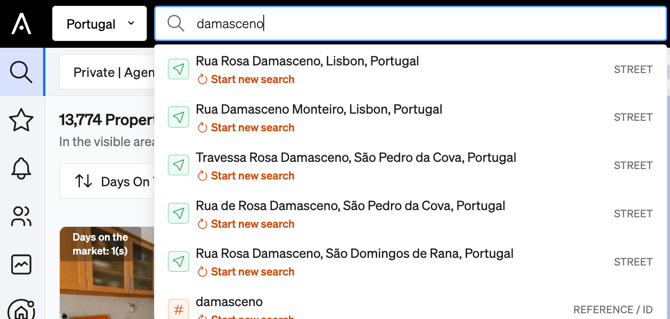
5. To narrow down the search results, adjust the filters under the top navigation bar.
🗺️ Draw on the Map
To search by a specific area:
- Go to the Map View in the property search page.
- Click on the Draw Tool (✏️).
- Use your mouse to outline the desired area.
- Release the mouse to complete the shape and apply the search filter.
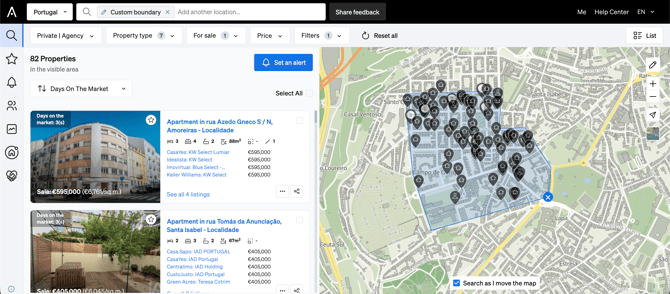
This is ideal for defining custom boundaries like neighborhoods or investment zones.
🧠 Tips for Better Results
- Combine search filters (e.g. price, typology, status) for precise results.
- Save your searches or set up Alerts to stay informed of new listings.
- Use the Smartlink tool to share search results with clients.
💼 Use Cases
|
User Type |
Common Use Scenario |
|
Buyer Agents |
Find properties by location or exact client needs |
|
Listing Agents |
Monitor listings in specific areas or for an agency |
|
Investors |
Search by market trends using map drawings |
Still have questions?
Contact support@casafari.com or visit our Help Center inside the platform.