
This is particularly useful for professionals who want to monitor a competitor’s portfolio or avoid duplicate listings from a particular agency.
📌 How to Use It
- Go to the Property Search page.
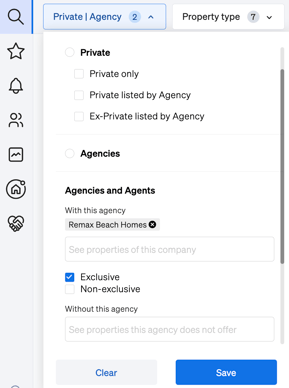
- Use the Property / Agency option section in the filter panel.
- Use:
-
- "With this agency" to view listings exclusively from a particular agency.
-
- "Without this agency" to remove listings from the chosen agency.
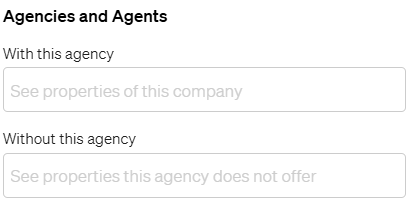
- "Without this agency" to remove listings from the chosen agency.
You can input the agency's name directly in either field.
4. Use:-
- Exclusive checkbox to search properties listed only by the specified agency
- Non-exclusive checkbox to search properties listed by not only the specified agency
🧠 Use Cases
|
Use Case |
How It Helps |
|
Competitor Tracking |
Monitor listings from a specific agency to stay informed. |
|
Lead Qualification |
Identify unique opportunities by excluding agency-listed properties. |
|
Portfolio Comparison |
Evaluate overlaps or gaps between agencies' offerings. |
|
Avoiding Duplicates |
Refine results to exclude properties already managed by a known agency. |
For further assistance, contact our support team at support@casafari.com or access the Help Center directly through your CASAFARI dashboard.
Enhance your strategic property search by mastering the agency filter today!