
🔐 Step 1: Log in to Your CASAFARI Account
- Go to www.casafari.com.
- Click Log in and enter your credentials.
🏠 Step 2: Open the Property Page
- Use Property Sourcing or the Quick Search Tool to locate the property you're interested in.
- Click the listing to open the full property details page.
📍 Step 3: Check the Location Scoring
1. Scroll down the property page until you reach the Location section.
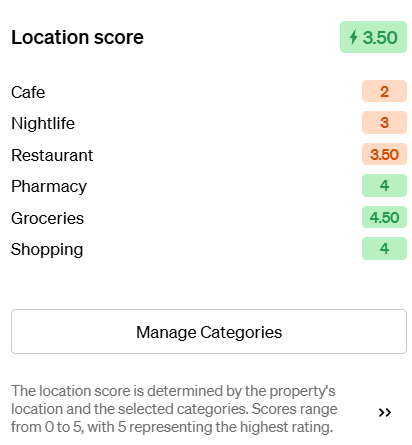
Each category is scored individually, giving you a quick overview of the property’s strengths and weaknesses in terms of location.
This will give you an average score ranging from 0 to 5, you can edit the content of that score.
💡 Tip:
Use the Location Scoring to match properties to your clients' lifestyle preferences—e.g., families looking for schools or professionals needing transport connections.
📩 Need Help?
If you’d like help understanding how the scores are calculated or how to use them in reports or client communications, contact us at: support@casafari.com