
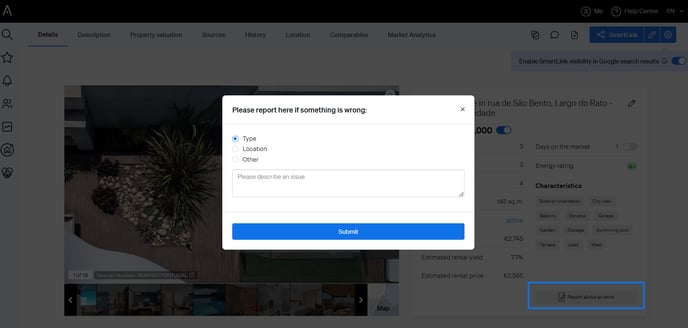
1. Report Directly from a Property Page:
If the issue is related to a specific property listing:
For general bugs or if you're unable to access the error report tool:
If the issue is related to a specific property listing:
- Open the property page of the listing in question.
- Locate the property details section (next to the image).
- Scroll to the bottom of the first information box and click on "Report an Error".
- Select the type of error from the dropdown menu.
- Provide a brief description of the issue you encountered.
- Click "Submit" to send your report to our team.
2. Contact Support Through the Help Center:
For general bugs or if you're unable to access the error report tool:
- Click on the Help Center icon located in the top right corner of your CASAFARI screen.
- Select "Contact Us" to send a message to our support team.
- Alternatively, you can email us directly at support@casafari.com.