
🔐 Step 1: Log in to Your CASAFARI Account
- Go to www.casafari.com.
- Click Log in and enter your credentials.
🏠 Step 2: Access the property sourcing tool
- Search for the property you want to evaluate using the search Tool.
📊 Step 3: Go to the property page
- On the property page, scroll down to the “property valuation” section to get an instant property valuation for that specific property.
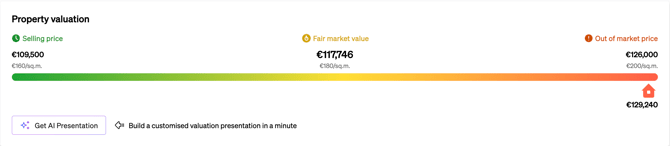
- If you wish to use the characteristics of this property to get a more complete valuation, you can click on the “Get AI Presentation” button to build a customised valuation presentation in a minute.
💡 Tip:
For best results, verify that the property’s key details (such as size, location, and features) are accurate before performing the valuation.
📩 Need Help?
If you need assistance with property valuations or interpreting the results, contact our support team at: support@casafari.com