
🔐 Step 1: Log in to Your CASAFARI Account
- Go to www.casafari.com
- Click Log in and enter your credentials.
👤 Step 2: Access Your Microsite Settings
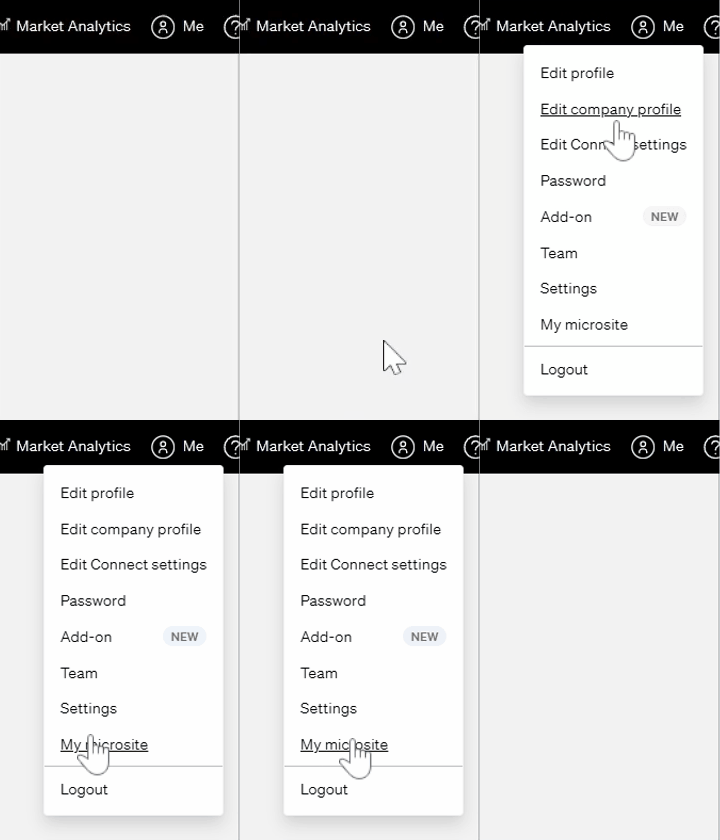
- After logging in, click on your profile icon (top-right corner).
- From the dropdown menu, select "My Microsite".
⚙️ Step 3: Enter Your Google Analytics ID
- In the Microsite configuration panel, scroll to the Lead Magnet Configuration section.
- Locate the field labeled "Google Analytics ID".
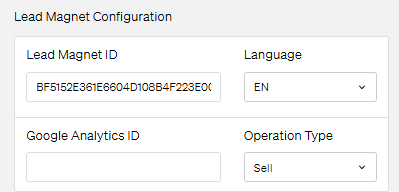
- Paste your Google Analytics Tracking ID (e.g., G-XXXXXXXXXX) into the input field.
💡 Tip: You can find this ID in your Google Analytics account under Admin > Data Streams > Web > Measurement ID.
- Click Save to apply the changes.
✅ What Happens Next?
Once added, Google Analytics will start collecting data from your Microsite automatically. You can monitor metrics like:
- Number of visitors
- Traffic sources
- Time spent on pages
- Conversion behavior
📩 Need Help?
If you need further assistance with Google Analytics integration, feel free to reach out to our support team at: support@casafari.com