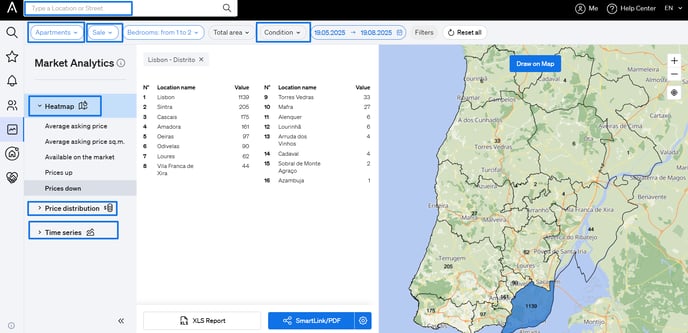
CASAFARI offers a Market Analytics tool that allows you to:
- Analyze market trends
- Monitor real estate supply and activity
- Extract market reports with the most accurate and up-to-date data
🧭 Step-by-Step: Performing a Market Analysis
- Log Into CASAFARI
Access your CASAFARI account with your credentials. - Select the Market Analytics Tool
From your dashboard, choose “Market Analytics.” - Choose a Location
Select the specific area or region you wish to analyze. - Apply Filters
Set filters according to your analysis goals, such as:
- Type of operation (Sale or Rent)
- Property type
- Condition (New, Renovated, etc.) - Set the Time Period
Define the time range you want to analyze (e.g., last 30 days, 6 months). - Review the Results
Analyze the data using visual tools like:
- Heatmap – for geographic price distribution
- Price distribution graph
- Time series chart – for trends over time