
🔐 Step 1: Log in to Your CASAFARI Account
- Visit www.casafari.com.
- Click Log in and enter your credentials.
📍 Step 2: Access the Property Valuation (CMA) Tool
- Open the CMA tool from the main menu.
- Search for the property you want to evaluate using the address, postcode, or cadastral reference.
⚙️ Step 3: Run the Valuation
- Fill out the property details under the "CMA settings" tab.
- Click Value to see your initial results.
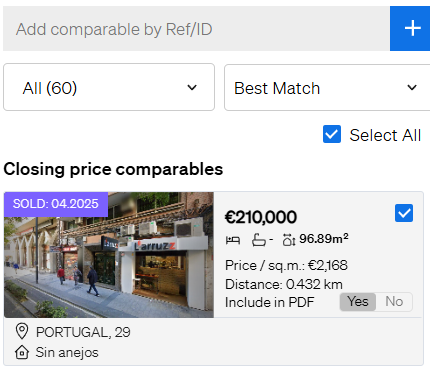
🧩 Step 4: Add or Remove Comparables
- Go to the "Evaluation" tab.
- To remove a comparable, click the box next to the listing.
- To add a new comparable, use the search bar to find and include properties manually by reference.
📄 Step 5: Generate a Custom Report
Once your comparables list is final, click Export & Share to edit the layout and content of your report, then export it as a PDF or share it via SmartLink.
💡 Tip:
Choose comparables that closely match the property’s location, size, and features for the most accurate analysis.
📩 Need Help?
If you need assistance adjusting your list of comparables, contact our support team at: support@casafari.com