
📌 Where Can I Add Properties as Favourites?
You can save properties to your favourites in two main ways:
1️⃣ From Property Sourcing
- Perform a search in Property Sourcing.
- In the search results, click the STAR⭐ icon on the top-right of the listing card.
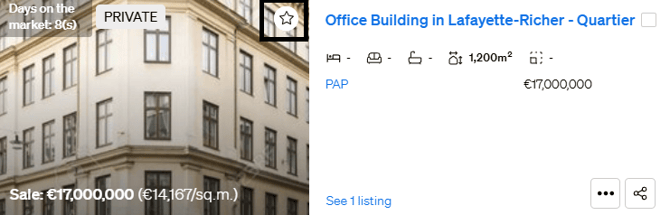
- Choose an existing folder or click Create New Folder to organize your favourites.
- The property is now saved and easily accessible from your Favourites section.
2️⃣ From the Property Page
- Open the listing you're interested in.
- Click the star icon in the upper-right corner of the property photos.
- Choose or create a favourites folder as desired.
- The listing will be added to your selected favourites folder for future reference.
📁 Why Use Favourites?
- Organize listings by client, location, or preference.
- Quickly access saved properties.
- Use favourites to create and share Smartlinks.
- Collaborate with your team or clients using shared folders.
🔄 Manage Your Favourites
You can rename, delete, or share your favourite folders at any time from the Favourites section on your CASAFARI dashboard.
🔗 Related Articles
For more support, reach out to support@casafari.com or use the live chat in your CASAFARI dashboard.