
🔁 Change Your Password from Within Your Account
If you're logged in and want to update your password:
- Go to www.casafari.com and log in.
- Click on the "Me" icon in the top-right corner.
- Select "Password" from the dropdown menu.
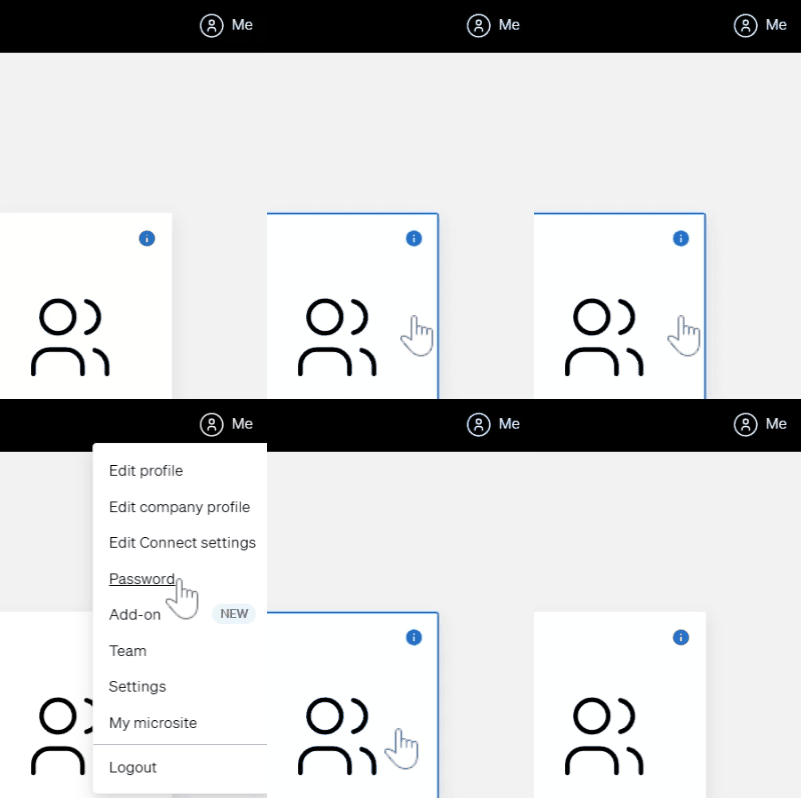
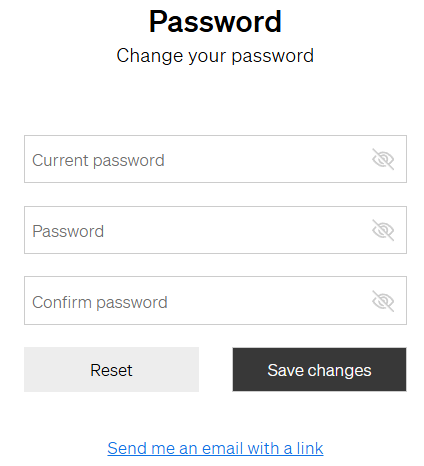
- Enter your current password and the new password you’d like to use
- Click Save to confirm the change.
❓ Reset Your Password If You Forgot It
If you can't access your account:
- Go to the CASAFARI login page: www.casafari.com
- Click "Forgot password?" below the login fields.
- Enter the email address associated with your CASAFARI account.
- Check your inbox and follow the link to create a new password.
✅ Password Tips for Better Security
- Use a mix of uppercase, lowercase, numbers, and symbols.
- Avoid using easily guessable passwords (e.g. "password123").
- Update your password regularly.
- Never share your password with anyone.