![login-logo.png]](https://helpcenter.casafari.com/hs-fs/hubfs/login-logo.png?height=23&name=login-logo.png)
Promote your property listings in 15 different countries with Green Acres and get your properties great international visibility.
Step by step:
-
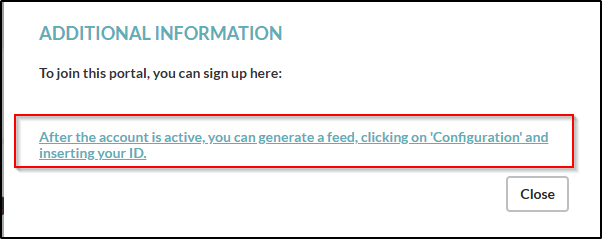
Create an account on the Green Acres portal. If not, you can request registration via CRM: go to Properties - Export - Portal Catalog - Green Acres and click on the icon (i) in the “Business Model” column.


-
You will be redirected to fill in a form in Green Acres.
-
At the end of this process, click on “Settings” in the Portal Catalogue, fill in the “Customer ID” you received after filling out the Green Acres form, and click “Save”.

-
An email will be sent to the CRM team so that we can activate the connection. Once it is active, you will receive a confirmation email.
-
If necessary, go to Properties - Export - Portal Catalog and set the limit of properties to be exported in the settings option.

-
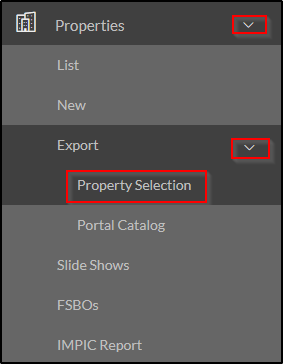
Go to Properties - Export - Property Selection and select the properties that should be sent to Green Acres.
- At the end of the process, you should go back to Portal Catalog > Edit Portal and copy the feed that was generated.
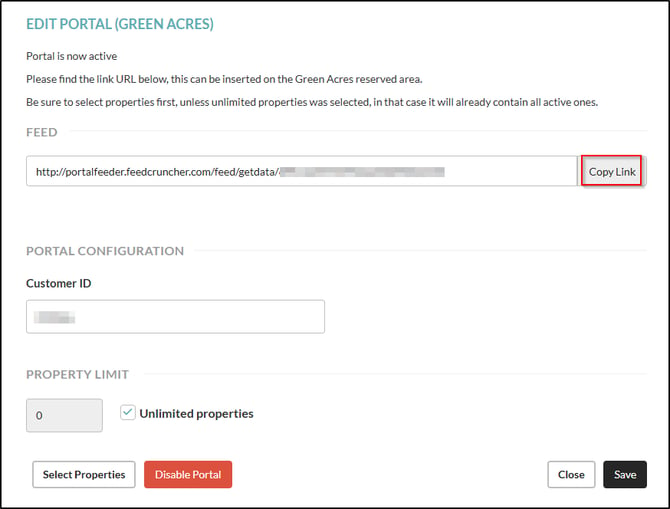 You should then place it in the portal's back office so that the export will be done using the generated feed.
To learn how to select properties for the portals and find out more about property limits, see this article: How to export properties to real estate portals?
Green Acres Remarks:
-
The reference of the property cannot exceed 20 characters.
- The import of leads from this portal is done by callback.
- The activation and management procedure for Green Acres is the same as for Vizzit.
Frequently Asked Questions:
“What is the current business model for this portal?”
You can publish an unlimited number of properties and only pay per lead received. Choose between 3 different prices per lead (12, 16 or 20 euros) to ensure more prominence for your advertisement and increase the chances of it being found on the portal. In addition, you must select a monthly budget.
For example:
You publish 50 ads and choose 10 leads at 16 euros each, i.e. a monthly budget of 160 euros. If, at the end of the month, you have only received 5 leads, you pay only 80 euros.
"I am exporting properties from a different system. What do I need to do to switch to CASAFARI CRM"?
Contact your Green Acres account manager and ask him to change your import system to CASAFARI CRM. The portal will confirm this change, along with your access details.
This feature is available for all CASAFARI CRM users.
For more information, contact us by email: help@casafaricrm.com