![login-logo.png]](https://helpcenter.casafari.com/hs-fs/hubfs/login-logo.png?height=23&name=login-logo.png)
Publish your property ads on BPI Expresso Imobiliário and capture new leads on one of the largest property portals in Portugal.
Step by step:
-
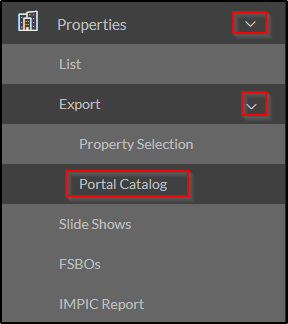
Create an account in the BPI Expresso Imobiliário portal. In case you do not have one, you can request registration through the CRM: go to Properties - Export - Portal Catalogue - BPI Expresso Imobiliário and click on the icon (i) in the “Business Model” column.

-
Click on the link (https://bpiexpressoimobiliario.pt/autenticacao/parceiro/registo) to be redirected to fill in a form.

-
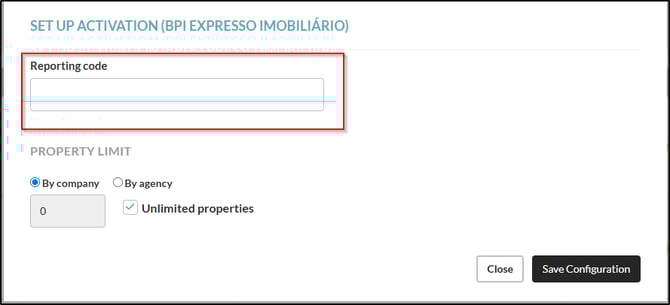
At the end of this process, click on “Configuration” in the Portal Catalog, fill in the “Reporting Code” you received after filling in the form. Click on “Save”.

-
If necessary, go to Properties - Export - Portal Catalogue and set the limit of properties to be exported in the Settings option.
-
Go to Properties - Export - Properties Selection and select the properties that should be sent to BPI Expresso Imobiliário.
BPI Expresso Real Estate Observations:
-
The maximum amount of images allowed is 20 per property.
-
The CRM property feed is updated once a day (usually in the early morning). However, the portal may take up to 12 hours to process it.
Frequently Asked Questions:
"I have removed my ownership in CRM but it is still showing up on BPI"
It is important to check when you have removed the property from CRM as this portal can take a few hours to process this change.
The same occurs when you add new properties to be exported.
"I am exporting properties from a different system. What do I need to do to switch to CASAFARI CRM"?
Contact your BPI Expresso Imobiliário account manager and ask him to change your import system to CASAFARI CRM.
Related articles:
How to export my properties to real estate portals?
How do I activate a property portal?
How do I consult the business model and contacts of each portal?
For more information, please contact us by email: help@casafaricrm.com